---
title: How to Connect Transend with Nexpart
description: It is easy to connect Transend with your Nexpart account.
---
[Skip to content](https://resources.transend.us/help-center/nexpart#main-content)
[Contact us](https://resources.transend.us/help-center/kb-tickets/new?hsLang=en)
[](https://resources.transend.us/help-center?hsLang=en)
- Additional Resources
Show submenu for Additional Resources
- [Transend Resource Center](https://resources.transend.us/help-center)
- [Video Library](https://transend.us/content/video/)
- [Warranty Support](https://resources.transend.us/warranty-support)
Open main navigation
Close main navigation
- Additional Resources
Show submenu for Additional Resources
- [Transend Resource Center](https://resources.transend.us/help-center)
- [Video Library](https://transend.us/content/video/)
- [Warranty Support](https://resources.transend.us/warranty-support)
- [Contact us](https://resources.transend.us/help-center/kb-tickets/new)
- [Visit Transend](https://transend.us/)
[Visit Transend](https://transend.us/)
How can we help you?
- There are no suggestions because the search field is empty.
1. [Transend Resource Center](https://resources.transend.us/help-center?hsLang=en)
2. [Getting started](https://resources.transend.us/help-center/getting-started?hsLang=en)
3. [System Connections](https://resources.transend.us/help-center/getting-started?hsLang=en#system-connections)
April 18, 2025
# How to Connect Transend with Nexpart
## Do you use Nexpart, or Nexpart Multi-Seller to find and order your parts? We have worked with Nexpart to make it easy to add your Transend account.
- Open your Nexpart Multi-Seller account and navigate to the “**Dashboard**” Select “**Find a new Seller**”

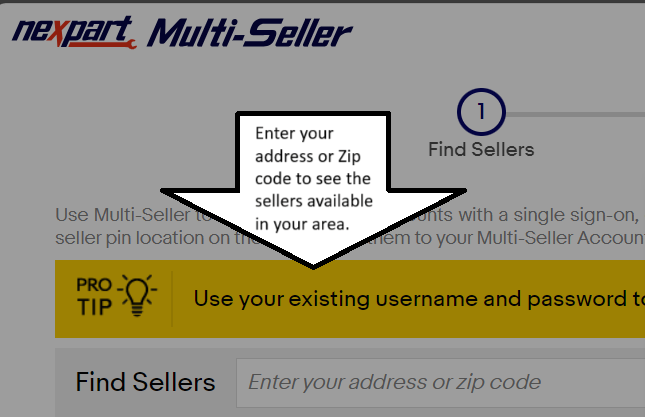
- Input your “**Address**” or “**Zip Code**” in the search bar to show the list of sellers available within your area
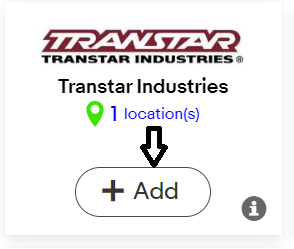
- Click “**Add**” on the Transtar option
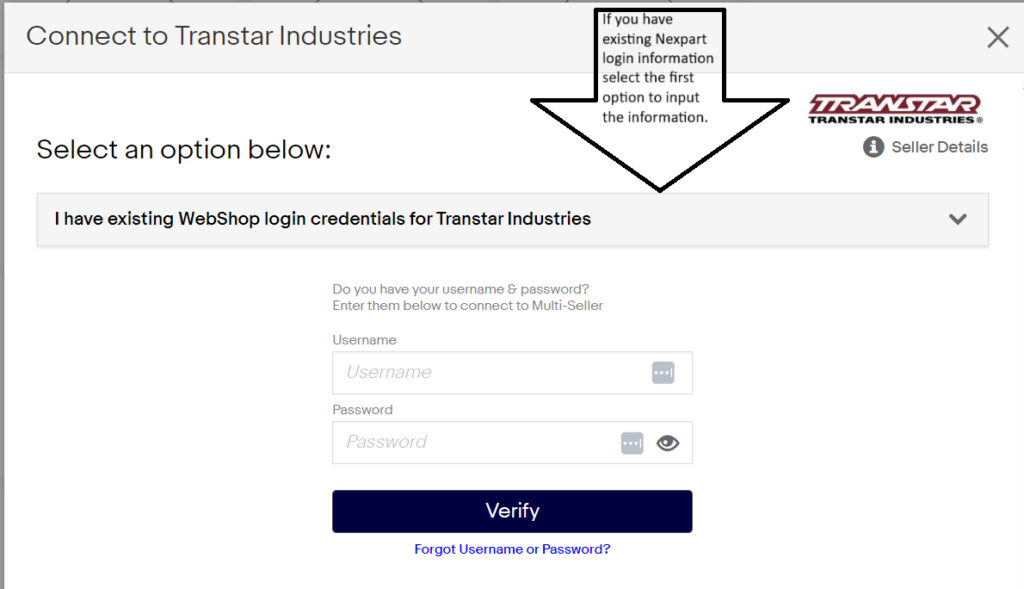
- If you have an existing account select the first option “**I have existing credentials**” and input your login information
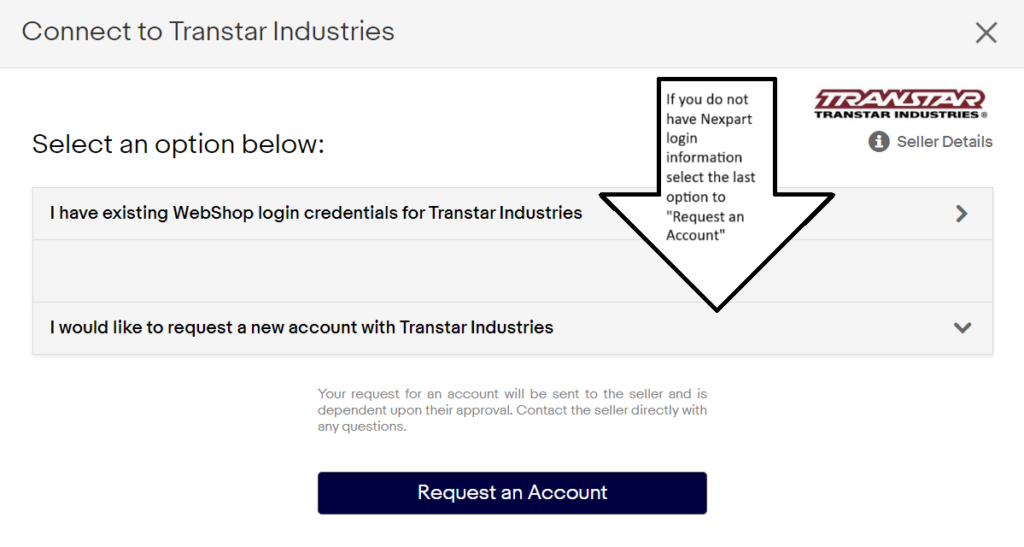
- If you do not have Nexpart login information select the last option “**I would like to request a new account**” and click on the “**Request an Account**” option to submit your request
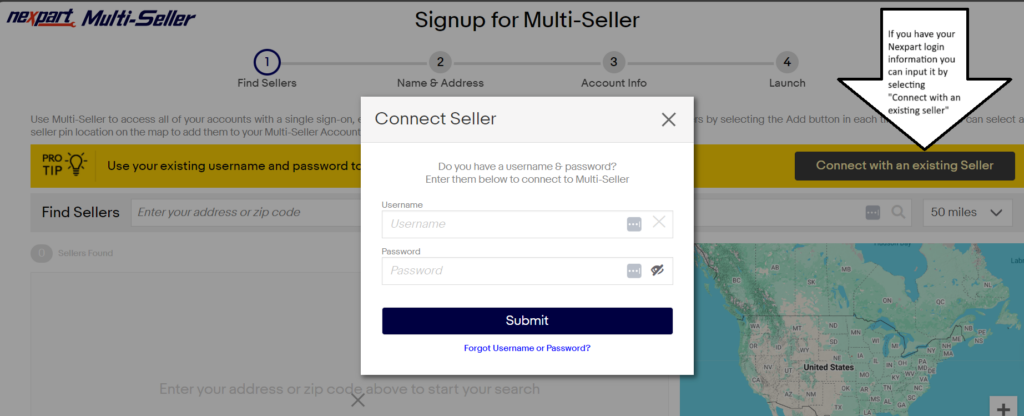
- If adding your account while creating your Multi-Seller account select “**Connect with an existing Seller**” during Step 2 of the account creation process and input your login information click "**Submit**" to connect your account
Need assistance? Contact Transend Support at [support@transend.us](mailto:support@transend.us)
- [Getting started](https://resources.transend.us/help-center/getting-started?hsLang=en#main-content)
- [Account Setup](https://resources.transend.us/help-center/getting-started?hsLang=en#account-setup)
- [System Connections](https://resources.transend.us/help-center/getting-started?hsLang=en#system-connections)
- [Account](https://resources.transend.us/help-center/account?hsLang=en#main-content)
- [Setup](https://resources.transend.us/help-center/account?hsLang=en#setup)
- [Guide](https://resources.transend.us/help-center/guide?hsLang=en#main-content)
- [Features](https://resources.transend.us/help-center/guide?hsLang=en#features)
- [General](https://resources.transend.us/help-center/general?hsLang=en#main-content)
- [Returns](https://resources.transend.us/help-center/general?hsLang=en#returns)
- [Warranty](https://resources.transend.us/help-center/general?hsLang=en#warranty)
- [Products](https://resources.transend.us/help-center/products?hsLang=en)
[](https://transend.us/)
Simplifying complex vehicle repair to keep the world moving.
[7350 Young Drive Walton Hills, Ohio, 44146](https://maps.app.goo.gl/VDeUiM8Yxqfmd3C89)
[mailto:TransendSupport@transend.us](mailto:TransendSupport@transend.us)
© NexaMotion Group, LLC. All rights reserved.